AI Calling Software for Inbound and Outbound Calls
Automate business phone calls with AI that answers customers, calls leads, books appointments, runs reminders, syncs CRM data, and routes complex calls to humans.
No credit card required. Test on a real phone call.
Key Takeaways
- Covers the full call lifecycle: TurboCall handles answering, dialing, routing, appointment booking, lead qualification, reminders, recordings, transcripts, and analytics.
- Built for operators as well as developers: Launch from templates, connect your CRM and calendar, and automate common workflows without stitching together separate AI vendors.
- Structured data from every call: Every conversation can produce a transcript, call summary, outcome, recording, lead score, task, and CRM update.
AI Calling Software Capabilities
What Is AI Calling Software?
AI calling software is a business phone automation platform that uses voice AI to make and receive phone calls. Instead of relying only on human agents, voicemail, or IVR menus, it lets an AI agent speak with callers, understand requests, take action, and log the result.
Modern AI calling platforms combine speech-to-text, large language models, text-to-speech, telephony, call recording, workflow logic, CRM integrations, and analytics. The goal is to turn repeatable phone conversations into measurable business workflows.
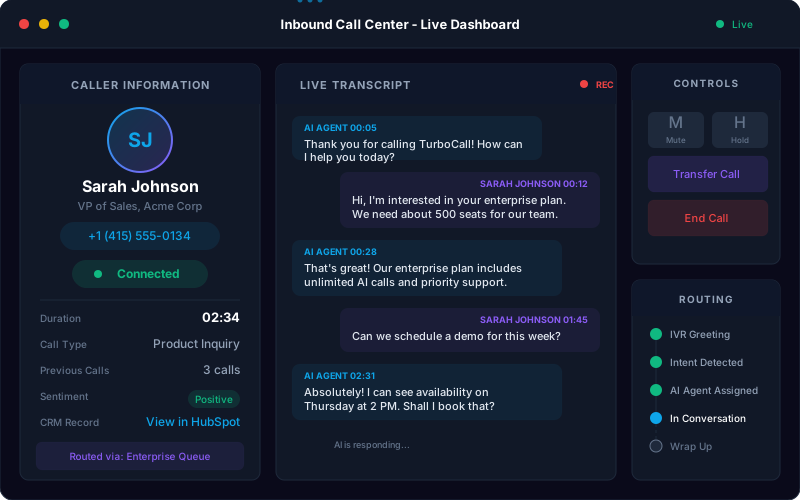
TurboCall brings inbound and outbound calling together: AI receptionist, AI phone agent, call center automation, lead qualification, appointment booking, reminder calls, and IVR-style routing all live inside the same platform.
One Platform, Multiple Calling Workflows
Start with the workflow that pays back fastest, then expand from the same calling platform.
Inbound Call Automation
Answer customer calls instantly, route callers by intent, handle support questions, book appointments, and transfer complex calls to staff.
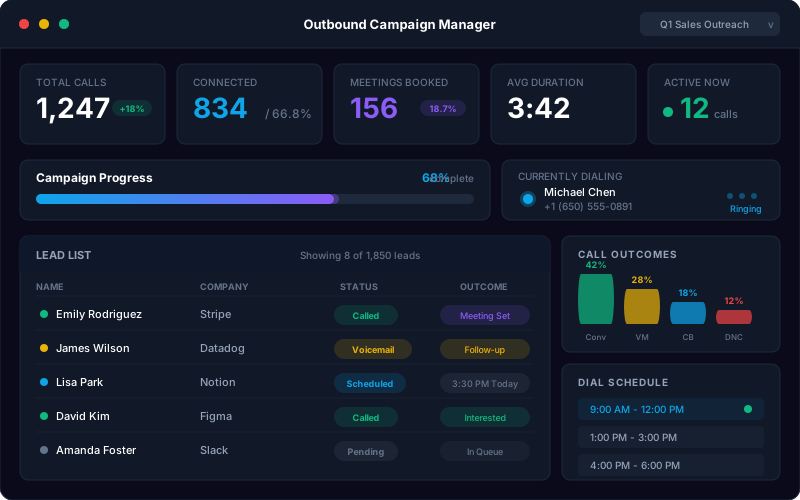
Outbound Call Campaigns
Call new leads, follow up with prospects, confirm appointments, run reminders, and log every outcome automatically.
AI Receptionist
Replace voicemail and basic answering services with a virtual front desk that works around the clock.
AI Phone Agent
Use one AI agent for inbound, outbound, qualification, scheduling, CRM sync, and human handoff.
AI Lead Generation
Qualify prospects by phone, score fit, book meetings, and send structured lead data to your CRM.
AI and IVR Workflows
Blend conversational AI with structured routing flows when deterministic branches are better than open-ended calls.
How Does TurboCall Work?
Launch one workflow, measure outcomes, then expand your call automation system.
Pick the Call Type
Choose inbound answering, outbound campaigns, appointment booking, lead qualification, support, reminders, IVR routing, or a specific industry template.
Connect Your Phone Stack
Use TurboCall numbers, forward your existing number, connect SIP/Twilio, or create campaign numbers for specific departments and workflows.
Configure the AI Workflow
Set greetings, questions, qualification rules, transfer paths, compliance disclosures, CRM fields, follow-up actions, and fallback behavior.
Launch and Optimize
Review transcripts, outcomes, recordings, analytics, and failed-call reasons, then improve the workflow with real call data.
What Features Should AI Calling Software Include?
TurboCall includes the core controls teams need to automate phone work safely and measureably.
One Platform for Business Calls
Manage inbound calls, outbound campaigns, phone agents, receptionists, IVR flows, recordings, transcripts, and analytics from one calling workspace.
Human-Like Conversations
The AI understands natural speech, asks clarifying questions, handles interruptions, and responds in a natural voice instead of playing a fixed script.
Visual Call Workflows
Build call paths for lead qualification, support, appointment booking, routing, reminders, follow-ups, surveys, and intake without coding.
Appointment and Reminder Automation
Book, confirm, reschedule, and remind customers by phone while syncing each action to your calendar or CRM.
CRM and App Integrations
Connect HubSpot, Salesforce, Zoho, Slack, Google Calendar, Twilio, and custom APIs so every call creates usable business data.
Compliance Controls
Configure AI disclosures, call recording notices, DNC suppression, opt-outs, calling windows, audit logs, and retention policies for safer automation.
Call Analytics
Track answer rate, connect rate, resolution rate, booked meetings, qualification outcomes, sentiment, call duration, failed calls, and revenue actions.
Multilingual Call Handling
Support customers across languages and regions using built-in and premium voice engines with language-aware routing.
Fast Launch Templates
Start from templates for healthcare, dental, law firms, home services, real estate, insurance, hotels, restaurants, ecommerce, and more.
From Call Answering to Revenue Workflows
TurboCall turns calls into structured business events. A caller asks a question, books an appointment, qualifies as a lead, requests a human, or opts out, and the outcome is saved where your team works.
- Inbound answering and routing for customer calls
- Appointment booking, reminders, and confirmations
- Call summaries, recordings, and transcripts attached to outcomes
- CRM updates and team alerts after every qualified call
Scale Outbound Without Losing Control
Run outbound campaigns with AI conversations, voicemail handling, compliance controls, calling windows, opt-out processing, CRM disposition sync, and campaign analytics.
- Speed-to-lead calls for new web forms and CRM contacts
- Follow-up campaigns for aged leads and appointment reminders
- Configurable AI disclosures, DNC suppression, and opt-out handling
- Connect rate, conversion rate, and booked-meeting dashboards
What Calls Can AI Calling Software Automate?
The best first workflows are high-volume, repeatable, and easy to measure. Start there, then use call analytics to decide what to automate next.
- Answering missed calls and after-hours calls
- Inbound customer support and FAQ handling
- AI receptionist and front-desk automation
- Outbound lead follow-up and speed-to-lead calls
- Appointment booking, reminders, and confirmations
- Sales qualification and meeting booking
- Customer reactivation and win-back calls
- Survey, feedback, and NPS collection
- Order status, returns, and ecommerce support
- Emergency intake and urgent call routing
- Payment reminders and account follow-up
- CRM call logging and workflow triggers
AI Calling Software vs Dialers vs Call Centers
AI calling software fits between basic dialers and fully human teams: more conversational than a dialer, more scalable than staffing every call.
Which Teams Use AI Calling Software?
TurboCall works wherever phone calls drive bookings, revenue, support, or urgent operations.
Healthcare and Dental
Patient scheduling, reminders, intake, refill requests, and after-hours routing.
Home Services
Emergency intake, estimate booking, missed-call recovery, and seasonal call surges.
Legal Services
Client intake, consultation booking, message capture, and routing by case type.
Real Estate
Lead qualification, showing scheduling, open-house follow-up, and missed-call capture.
Ecommerce and Retail
Order status, returns, product questions, customer support, and promotions.
Sales and Agencies
Outbound campaigns, speed-to-lead calling, qualification, and appointment setting.
Explore Related Calling Products
Choose the page that matches your first workflow, then expand from there.
AI Phone Agent
The core agent page for inbound, outbound, CRM sync, and human handoff.
Inbound AI Call
Automate customer support, routing, booking, and after-hours answering.
Outbound AI Call
Run compliant outbound campaigns for qualification, reminders, and follow-up.
AI Receptionist
Use AI as a virtual front desk that answers, routes, and books appointments.
Frequently Asked Questions About AI Calling Software
The practical details buyers usually ask before automating phone calls.
What is AI calling software?
AI calling software is a platform that uses voice AI to make, receive, route, and analyze phone calls. It combines speech recognition, language models, text-to-speech, telephony, call workflows, CRM integrations, recordings, transcripts, and analytics so businesses can automate repeatable phone work.
How is AI calling software different from a power dialer?
A power dialer helps humans place more calls. AI calling software can hold the conversation itself. It can ask questions, answer common requests, qualify leads, book appointments, leave summaries, sync CRM data, and transfer calls when a human is needed.
Can TurboCall handle both inbound and outbound calls?
Yes. TurboCall supports inbound call answering, AI receptionist workflows, outbound call campaigns, appointment reminders, speed-to-lead follow-up, lead qualification, customer support, IVR routing, and CRM call logging.
Can AI calling software replace a call center?
AI calling software can automate many repetitive call center workflows, but it should not replace humans for every scenario. The strongest setup uses AI for repeatable calls and human teams for complex, sensitive, or judgment-heavy conversations.
What should I automate first?
Start with high-volume calls that follow a predictable process: missed-call recovery, appointment booking, lead qualification, order status, reminder calls, after-hours intake, and FAQ handling. These workflows are easier to test, measure, and improve.
Does TurboCall integrate with CRMs?
TurboCall connects with HubSpot, Salesforce, Zoho, Slack, Google Calendar, Twilio, and custom systems through APIs and webhooks. Calls can sync transcripts, summaries, dispositions, recordings, lead fields, and follow-up tasks.
Is AI calling software legal?
AI calling can be legal when configured properly, but outbound campaigns must follow consent, disclosure, do-not-call, opt-out, calling-hours, and industry-specific rules. TurboCall includes configurable compliance controls, but your team should review requirements before launch.
How quickly can I launch TurboCall?
Simple inbound or outbound workflows can be tested the same day using templates. More complex launches with custom CRM fields, compliance review, multi-location routing, or custom APIs usually take a few days to a couple of weeks.
Can I keep my current business number?
Yes. You can forward existing numbers into TurboCall or use bring-your-own-number/SIP-style setups where supported. You can also create new numbers for campaigns, locations, departments, or testing.
Which industries use AI calling software?
AI calling software is useful anywhere phone calls drive revenue or operations. Common examples include healthcare, dental, law firms, HVAC, roofing, solar, insurance, mortgage, real estate, hotels, restaurants, ecommerce, automotive, logistics, SaaS support, and debt collection.
Ready to Automate Business Calls?
Start with 10 free minutes, test TurboCall on a real phone call, and launch your first inbound or outbound workflow from a template.